CodonCode Corporation
Better Software for DNA Sequencing

Gibson Assembly with CodonCode Aligner

Gibson Assembly is a powerful method for joining multiple DNA fragments in a single, isothermal reaction - without the need for restriction sites or ligase. CodonCode Aligner supports efficient in silico planning of Gibson Assembly projects by helping you design overlapping primers, visualize fragment junctions, and simulate the final construct before heading to the lab. Whether you're assembling two fragments or building a larger construct, Aligner provides the tools to reduce trial-and-error and increase cloning success through accurate virtual design.


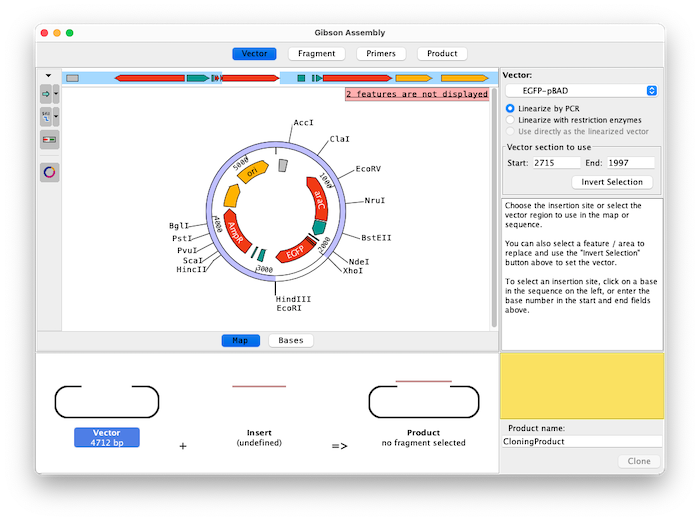
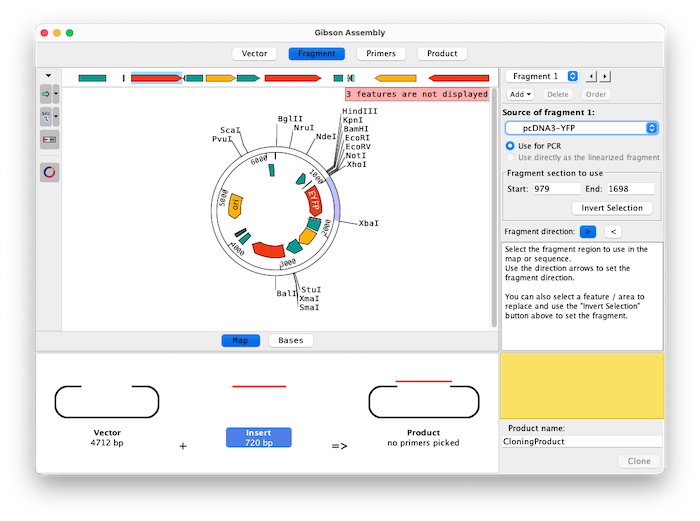
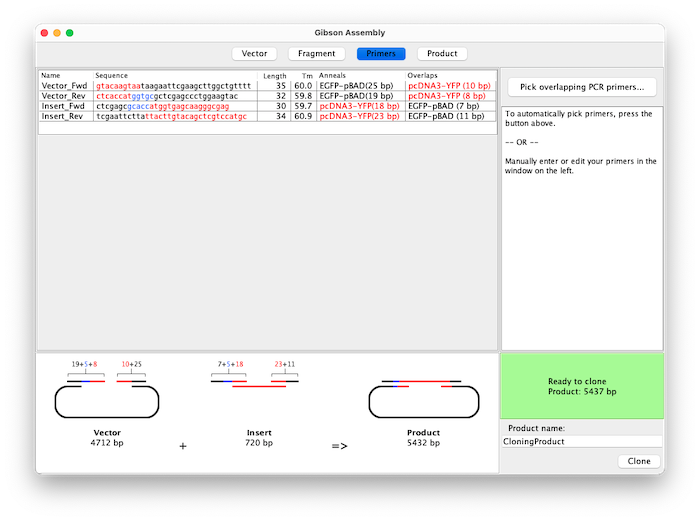
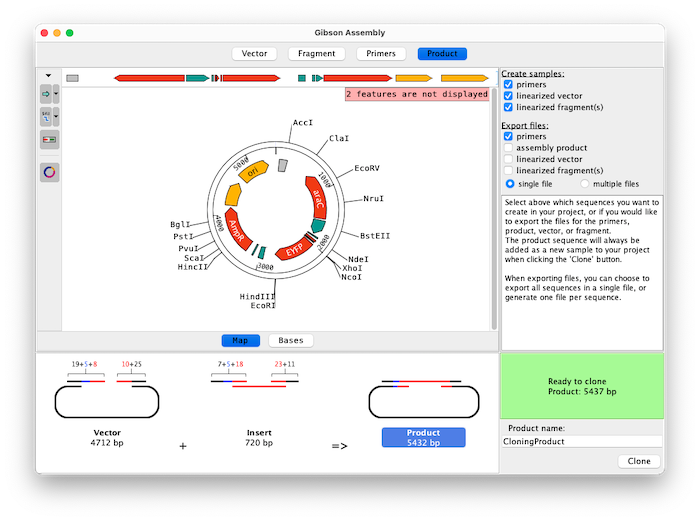
Gibson Assembly Product Gibson Assembly Vector Gibson Assembly Fragment Gibson Assembly Primers
Gibson Assembly


How Gibson Assembly Works in CodonCode Aligner

Assemble up to 15 fragments with Aligner's Gibson Assembly feature. Easily select fragments to amplify by clicking on features, selecting regions between enzymes, inverting exisiting selections, typing in a specfic range of bases, and flipping fragment directions.

Primers are generated automatically based on your chosen overlap and Tm preferences. A table displays all primers with their information and different colors highlight the different primer sections. You can also edit primers manually - for example to add spacers or adjust the reading frame.

Switch between map and base view during the cloning product to get a great overview of all features as well as a detailed view of the bases for vector, fragments, and product.

Choose which sequences of the experiment are added to your project and export any combination of sequences and primers directly while planning your cloning experiment.

To learn more about Gibson Assembly in CodonCode Aligner, look at the Gibson Assembly video tutorial, and check out our detailed how-to guide for simulating Gibson Assembly.

Best Practices and Tips for Gibson Assembly in CodonCode Aligner

To ensure high success rates with Gibson Assembly, careful design and preparation are essential. Below are practical tips and best practices to help you optimize your cloning experiments and reduce errors — both in the lab and during virtual planning with CodonCode Aligner.

  • Primer Overlap
    Design primers with 15–40 bp overlaps to ensure efficient and specific fragment joining. You can set the number of overlapping bases when designing primers with the Gibson Assembly wizard. Larger inserts or multiple inserts should generally have longer overlaps.
  • Primer Tm
    Check melting temperatures (Tm) of overlapping regions — aim for similar Tm values to promote stable hybridization. Set the optimal Tm for overlapping regions only, or for the primers as a whole, and let Aligner design the correct primers for you.
  • Check Sequence Similarities
    Double-check for sequence similarities that might lead to misalignment or unintended recombination events. This is especially tru when working with multiple fragments.
  • Verify Compatibility
    Verify sequence compatibility across junctions in silico with CodonCode Aligner to prevent frameshifts or stop codons.
  • Reaction Time
    For Gibson Assemblies with long fragments or several fragments you may need to increase incubation time for successful ligation. Generally 4 or more fragments will require a reaction time of an hour or even more.

Explore Other Cloning Methods and Features in CodonCode Aligner

CodonCode Aligner supports many molecular cloning techniques beyond Gibson Assembly. Explore these additional pages to learn how Aligner helps you design, simulate, and verify different cloning workflows:

  • TA Cloning
    Learn how to simulate TA cloning and verify insert orientation before going to the bench.
  • Restriction Cloning
    Simulate restriction enzyme digests, ligation, and insert orientation with support for hundreds of enzymes.
  • Directional TOPO Cloning
    Learn how to simulate directional TOPO cloning and verify insert orientation before going to the bench.
  • Blunt-End PCR Cloning
    Plan and test blunt-end ligation of PCR products and vectors, with annotation and map preview features.
  • Molecular Cloning
    Overview of virtual molecular cloning methods in CodonCode Aligner.
  • Primer Design
    Design primers using Primer3. Adjust parameters like primer characteristics and reaction conditions to create PCR, cloning, and sequencing primers that specifically match your workflow.
  • Virtual Gels and RFLP Analysis
    Use virtual gels to verify your insert(s). You can look at restriction maps and virtual gels for single sequences, or even compare multiple sequences (for example your cloning product in both directions) using the RFLP analysis tool in Aligner.